How to Create a Restaurant Website
Learn how to build a restaurant website that helps customers find you, view menus, take action, and trust your business.

What Your Website Should Do
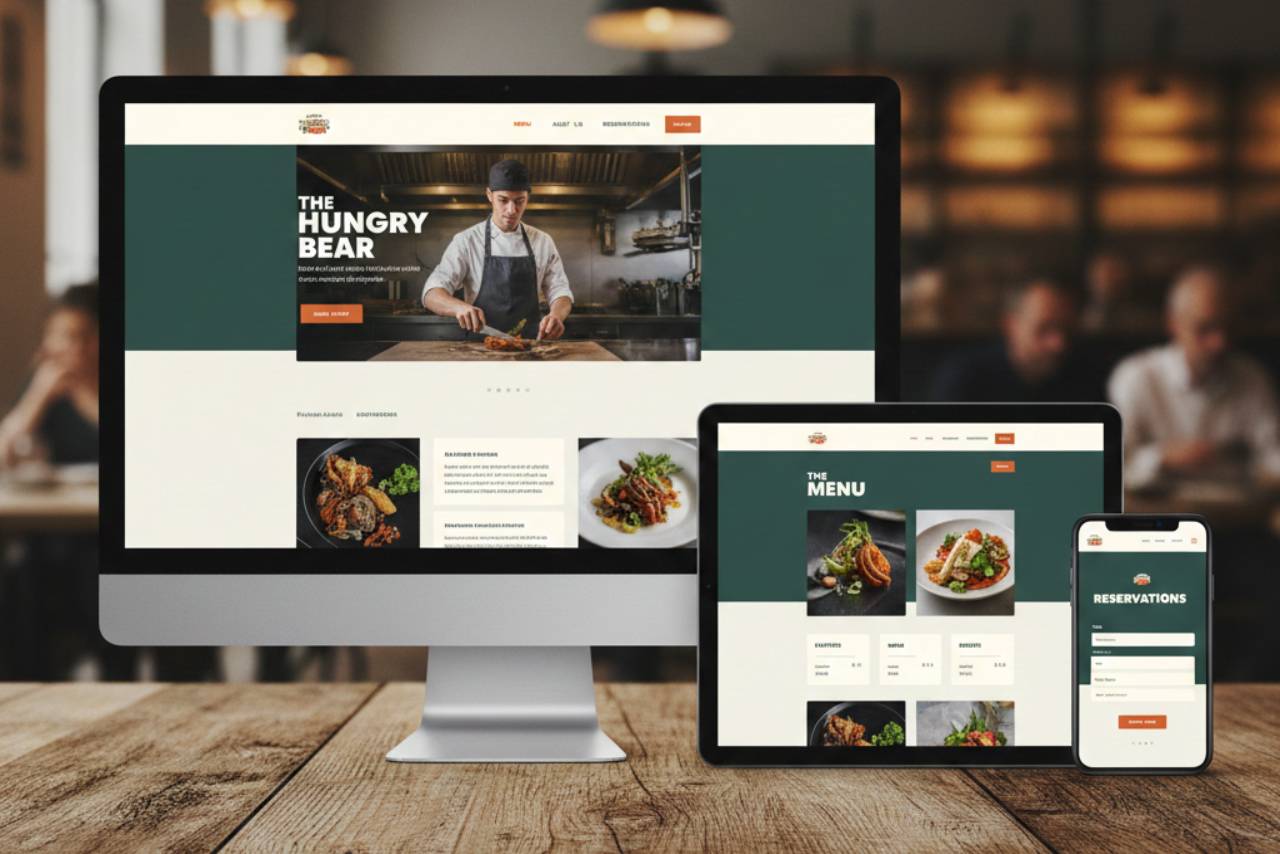
A restaurant website is not just a place to "have your business online." It should help customers quickly understand who you are, what you serve, and how to order, book, or visit. In simple terms, your website should make it easy for people to choose your restaurant.
Many restaurant owners think of a website as an online brochure. It can do much more than that. A good restaurant website works like a front door that is open all day. People visit your site when they want to check your menu, see your hours, find your location, look at photos, place an order, or make a reservation. If they cannot find that information fast, they may leave and choose another place.
Your website should support a few main business goals -
1. Help Customers Find You - Your website should clearly show your restaurant name, address, phone number, and hours. This is basic, but it is one of the most important jobs of your website. Customers often visit a website just to answer simple questions like -
- Are you open right now?
- Where are you located?
- Do you offer dine-in, takeout, or delivery?
- How can they contact you?
If this information is hard to find, it creates friction. A good website removes that friction.
2. Build Trust Before a Customer Visits - Before people try a restaurant, they want to feel confident about it. Your website helps create that trust. Clean design, clear photos, updated menus, and accurate business info all send a message that your restaurant is professional and reliable.
Customers often decide within seconds if they want to keep browsing. If your website looks outdated, has broken links, or shows old menus and wrong hours, they may assume the same about the restaurant experience. A strong website helps you make a good first impression.
3. Show Your Menu Clearly - For many customers, the menu is the main reason they visit your website. They want to know what you serve, how much it costs, and if you have options that fit their needs.
Your menu page should be easy to read and updated regularly. It should not force people to download a file that is hard to open on a phone. A clear menu helps customers decide faster and reduces confusion before they order or visit.
4. Turn Visitors Into Action - A restaurant website should not just provide information. It should guide people to take action. That action may be -
- Place an online order
- Make a reservation
- Call your restaurant
- Get directions
- Ask about catering
- View your menu
This is why your website needs clear buttons and simple page layouts. Every page should make the next step obvious.
5. Support Your Marketing and Local Visibility - Your website also helps your restaurant appear more professional across digital channels. When people find you on Google, social media, or review platforms, they often click through to your website to learn more.
A well-built website supports your local marketing by giving customers one reliable place for your -
- Menu
- Hours
- Contact info
- Promotions
- Brand story
It also helps keep your information consistent, which is important for online visibility and customer trust.
6. Work Well on Mobile - Most customers will visit your restaurant website from a phone, not a desktop computer. That means your website should be mobile-friendly from the start. People should be able to -
- Read your menu without zooming in
- Tap to call
- Tap for directions
- Order online easily
- Book a table quickly
If your website is hard to use on mobile, you may lose customers even if your food and service are great.
A restaurant website should help your business in practical ways. It should save customers time, answer common questions, and make it easy for them to choose your restaurant. It should also reduce the number of calls asking for basic information by putting the right details in the right place.
Plan Your Website Before
Before you choose a website platform, design, or colors, take time to plan. This step saves a lot of time later. Many restaurant websites become confusing because owners start building too quickly without deciding what the website needs to do. A simple plan helps you build a website that is useful, not just attractive.
Start by defining your main goal. Ask yourself, what do I want this website to help me with most? Your answer might be -
- Bring in more dine-in guests
- Increase online orders
- Get more reservations
- Promote catering
- Help people find your location and hours
- Show your menu clearly
You may have more than one goal, and that is fine. But choose one primary goal first. This helps you decide what customers should see and click when they land on your homepage.
Next, think about your customers. A restaurant website should be built around what customers need, not just what the owner wants to say. For example -
- A quick-service restaurant customer may want the menu, prices, and online ordering fast
- A casual dining customer may want photos, menu details, and hours
- A fine dining customer may want reservations, atmosphere photos, and location info
- A catering customer may want a menu, inquiry form, and contact details
This is important because different visitors come to your site for different reasons. Your website should make the most common tasks easy.
Then, decide what actions you want people to take on each page. This is sometimes called a next step. For example -
- On the homepage. View menu, order online, reserve a table
- On the menu page. Place an order or call
- On the contact page. Get directions or send a message
- On the catering page. Fill out an inquiry form
Planning these actions early helps you avoid cluttered pages with too many buttons and mixed messages.
You should also gather your website content before you build. Collect -
- Your current menu and prices
- Hours of operation
- Address and phone number
- Logo
- Photos of food and restaurant
- Reservation or ordering links
- Short description of your restaurant
When you plan first, the website-building process becomes much easier. You make better decisions, avoid rework, and create a site that supports your business goals from day one.

Choose a Domain Name and Website Platform
Once you know what your website needs to do, the next step is choosing your domain name and website platform. These two choices matter because they affect how easy your site is to build, manage, and find online.
Start with the domain name. This is your website address (for example, yourrestaurant.com). Keep it simple, clear, and easy to remember. In most cases, the best option is your restaurant name plus a common ending like .com. If that is not available, you can try a small variation, such as adding your city or neighborhood.
Here are a few tips for choosing a good domain name -
- Keep it short and easy to spell
- Avoid hyphens and extra words if possible
- Use your real restaurant name for brand consistency
- Make sure it matches the name customers see on Google and social media
For example, if your restaurant is called "Oak Street Grill," a strong domain could be OakStreetGrill.com. A weaker version would be something longer or harder to type.
After that, choose a website platform. A platform is the tool you will use to build and manage your site. Most restaurant owners choose one of these options -
1. Website Builders - These are drag-and-drop tools made for non-technical users. They are often the best choice for owners building a website for the first time. They usually include templates, hosting, and basic support in one package.
2. Restaurant-Specific Platforms - Some platforms are built specifically for restaurants and may include menu tools, online ordering, and reservation features. These can save time if you want built-in restaurant functions.
3. CMS Platforms - A content management system gives more control and customization, but it may require more setup and maintenance. This is a better fit if you need advanced features or have someone helping with development.
When comparing platforms, focus on practical features, not just design templates. Look for -
- Mobile-friendly templates
- Easy menu updates
- Online ordering or reservation integrations
- Contact forms and map support
- SEO settings (page titles, descriptions, location pages)
- Fast loading speed
- Easy editing for non-technical users
The best platform is the one you can actually manage. If updating your menu or hours feels difficult, the website may become outdated. Choose tools that make it easy to keep your site accurate and current. That will help your website stay useful for customers and for your business.
Create the Must-Have Pages
A restaurant website does not need a lot of pages to be effective. What it needs is the right pages with clear information. The goal is to help customers quickly find what they need and take action. If your website is missing key pages, customers may leave before they order, call, or visit.
Start with the Home Page. This is the first page many people will see, and it should immediately answer basic questions - what kind of restaurant are you, where are you, and what should the customer do next? Your homepage should include your restaurant name, a short description, a strong photo, and clear buttons such as View Menu, Order Online, or Make a Reservation. It should also show your hours, address, and contact information or link to them clearly.
Next is the Menu Page, which is one of the most important pages on your site. Many customers visit your website only to view your menu. Make it easy to read on a phone and keep it updated. Include item names, prices, and short descriptions when helpful. If you have dietary options (vegetarian, gluten-free, etc.), label them clearly. Avoid using outdated PDFs if possible, especially if they are hard to read on mobile.
You should also have an About Page. This page helps customers connect with your brand. It does not need to be long. A short story about your restaurant, your food style, and what makes your place different is enough. This is also a good place to include a few photos of your space, team, or signature dishes.
The Location and Contact Page is another must-have. This page should include -
- Full address
- Phone number
- Hours of operation
- Map or directions link
- Parking details (if needed)
- Contact form (optional)
If you take reservations or online orders, create a dedicated Reservations or Online Ordering Page (or both). Even if you link to a third-party system, make that option easy to find.
You can also add optional pages later, such as Catering, Private Events, Careers, or FAQ. Start with the essentials first. A simple website with the right pages works better than a large website with missing or unclear information.
Write Clear Website Content Customers Can Use
Once your main pages are set up, the next step is writing the content. This is where many restaurant websites become hard to use. The design may look good, but the words are unclear, too long, or missing important details. Good website content should be simple, accurate, and easy to scan.
Start with your homepage message. When someone lands on your site, they should quickly understand what your restaurant offers. You do not need a long paragraph. A short headline and one or two sentences is usually enough. Focus on the basics -
- What type of restaurant you are
- What you are known for
- Where you are located (or service area)
For example, a strong homepage message can clearly tell people what to expect and encourage them to view the menu or place an order.
Next, spend time on your menu content. This is one of the most visited parts of your website, so clarity matters. Each menu section should be easy to read, especially on mobile. Include -
- Item names
- Prices
- Short descriptions (when needed)
- Dietary labels or notes (if applicable)
Keep descriptions useful and direct. Customers want to know what the item is, not read long marketing language. Also, make sure your menu matches what you currently serve. An outdated menu creates frustration and can lead to customer complaints.
Your business information also needs to be written clearly and consistently across the site. This includes -
- Hours of operation
- Address
- Phone number
- Email (if used)
- Reservation details
- Ordering options
Double-check that these details are correct on every page. Even small mistakes, like wrong hours or an old phone number, can hurt trust and cause missed business.
It also helps to write with scanning in mind. Most people do not read every word on a website. They scan for answers. To make your content easier to use -
- Use short paragraphs
- Use clear page headings
- Break up information with bullet points
- Avoid large blocks of text
Finally, keep your tone consistent. Your website should sound like your restaurant - casual, family-friendly, upscale, fast, or local - but still be easy to understand. Clear content helps customers make quick decisions. When your website answers questions fast, people are more likely to order, reserve, or visit.
Add Photos, Branding, and Design
After your pages and content are in place, the next step is making the website look and feel like your restaurant. This does not mean you need a complicated design. It means your website should visually match your brand and help customers feel confident about visiting.
Start with photos, because they make a big difference. For restaurants, real photos build trust faster than almost anything else. Customers want to see your food, your space, and the overall experience. Use clear, high-quality photos of -
- Signature menu items
- Dining area or interior
- Exterior/storefront
- Drinks or desserts
- Staff or service moments (optional)
Try to avoid generic stock photos. Stock images can make your website feel less personal and less trustworthy. Real photos show customers what to expect and help your restaurant stand out.
Next, keep your branding consistent. Your website should match your restaurant's look across menus, signage, and social media. This includes -
- Logo
- Brand colors
- Font style
- Tone of images
For example, if your restaurant has a modern and clean style, your website should feel simple and polished. If your brand is more casual and family-friendly, your website can feel warm and approachable. Consistency helps customers recognize your business and remember it.
When it comes to design, focus on usability first. A restaurant website should be easy to read and easy to navigate. A few design basics go a long way -
- Use readable font sizes
- Keep strong contrast between text and background
- Leave space between sections (do not overcrowd pages)
- Use clear buttons for actions like Order Online or Reserve a Table
- Keep your menu and contact info easy to find
It is also a good idea to keep your layout simple. Too many colors, animations, or pop-ups can distract customers and slow down the site. A clean design usually performs better because people can find what they need faster.
Finally, think of design as part of customer experience. Your website gives people an early impression of your restaurant before they ever visit. If the site looks clean, organized, and current, it supports trust. If it looks outdated or confusing, it may hurt interest.
Set Up Mobile-Friendly Features and Customer Actions
Most people will visit your restaurant website on a phone, not a computer. That is why mobile design is not just a nice feature. It is a core part of your website. If customers cannot use your site easily on mobile, they may leave before they place an order, make a reservation, or even check your hours.
Start by making sure your website uses a mobile-friendly layout. This means the site automatically adjusts to smaller screens. Text should be readable without zooming in, buttons should be large enough to tap, and pages should not feel crowded. If a customer has to pinch, zoom, or scroll too much just to find your menu, the website is not doing its job.
Next, focus on the most important customer actions. A restaurant website should make it very easy for people to take the next step. On mobile, this usually means adding clear buttons for -
- Call Now
- Get Directions
- View Menu
- Order Online
- Make a Reservation
These buttons should be easy to find on the homepage and other key pages. Many restaurant websites lose customers because these actions are buried in menus or placed too far down the page.
Your menu experience on mobile also matters. Menu pages should load quickly and be easy to scroll. Organize menu sections clearly (for example- appetizers, mains, drinks, desserts), and avoid tiny text. If you use a PDF menu, make sure it opens properly on phones. In most cases, a built-in webpage menu is easier for customers to use.
You should also test all links and forms on a phone before launching. Check things like -
- Does the call button dial correctly?
- Does the map button open directions?
- Does the order link go to the right page?
- Does the reservation form work?
- Are your hours and location easy to read?
Another good mobile feature is a sticky action bar (a small bar that stays visible while scrolling) for calling, ordering, or getting directions. This makes it easier for customers to act quickly without searching.
Mobile-friendly design directly affects sales and customer convenience. If people can find what they need in seconds, they are more likely to choose your restaurant. The easier your website is to use on a phone, the more useful it becomes for your business every day.